New Three new products: fordway trading ERP, UEPS cloud rendering and WPECS delivery and operations View products →
WPECS

WPECS

One binary to manage the full application lifecycle on every Linux host

Turns a private delivery of dozens of servers and twenty-plus middleware components into a web wizard: enter IPs and credentials, pick a solution, confirm the plan, and the platform runs pre-checks, installs in parallel by dependency, initializes clusters and verifies the integration automatically. Monitoring, diagnosis, rolling upgrades, scaling, inspections and backups happen in the same platform. No agent on target hosts, and fully offline environments are supported.

WPECS screenshot

Key features

8 key capabilities of WPECS at a glance

01

Guided deployment

A 7-step wizard: choose apps, add hosts, auto-assign roles, set parameters, pre-check, review the plan, run; every component verifies its integration, failed steps are classified with fix suggestions, and you can retry only the failures

02

Full-stack orchestration, HA by default

Plan big data, time series, microservices, databases, IoT, storage, gateways and monitoring in one go; Keepalived VIPs, MySQL dual primary, Redis Sentinel, Hadoop / HBase standby, Doris with 3 FEs, Nacos Raft, distributed MinIO and more

03

Per-machine adaptive tuning

Key parameters are calculated from each machine's CPU, memory and disk type, co-located components share memory without overcommitting, kernel settings follow the load profile, and every result is written to the deployment log

04

Legacy adoption

Import an existing config.ini and discover 30+ kinds of components and their actual versions read-only, never changing the host; services without systemd units or ports are monitored by command line or container state

05

Rolling upgrades and scaling

Download the new version while the old one keeps running, upgrade node by node with health checks and automatic rollback; scaling checks quorum, plus scheduled inspections, backups and one-click restore

06

Monitoring, alerts and diagnosis

Host and process monitoring, security events and 43 layered diagnosis rules (L1 host to L4 application); alerts are diagnosed automatically and pushed to Feishu, DingTalk or WeCom, with an optional internal LLM

07

Vulnerabilities and security

Deployed components and system software such as OpenSSH and OpenSSL are matched against NVD CPE version ranges; non-destructive web vulnerability scanning; AES-256-GCM encrypted credentials, hash-chained audit, two-factor sign-in and LDAP / OIDC

08

Minimal, offline-ready delivery

A single static binary for 7 CPU architectures and no agent on target hosts; packages are downloaded once into the platform's repository and pushed to nodes, and can be exported per architecture and imported offline with one command

What it is

Delivering a private deployment often means dozens of servers, twenty-plus middleware components, hundreds of parameters and a pile of shell scripts that only their author understands. WPECS turns that into a web wizard, and brings monitoring, diagnosis, upgrades, scaling, inspections and backups after delivery into the same platform: one Go binary that manages every Linux host over SSH, with no agent on the target hosts.

47built-in components
7CPU architectures
43layered diagnosis rules
30+component types recognized for adoption
0agents on target hosts

Screenshots

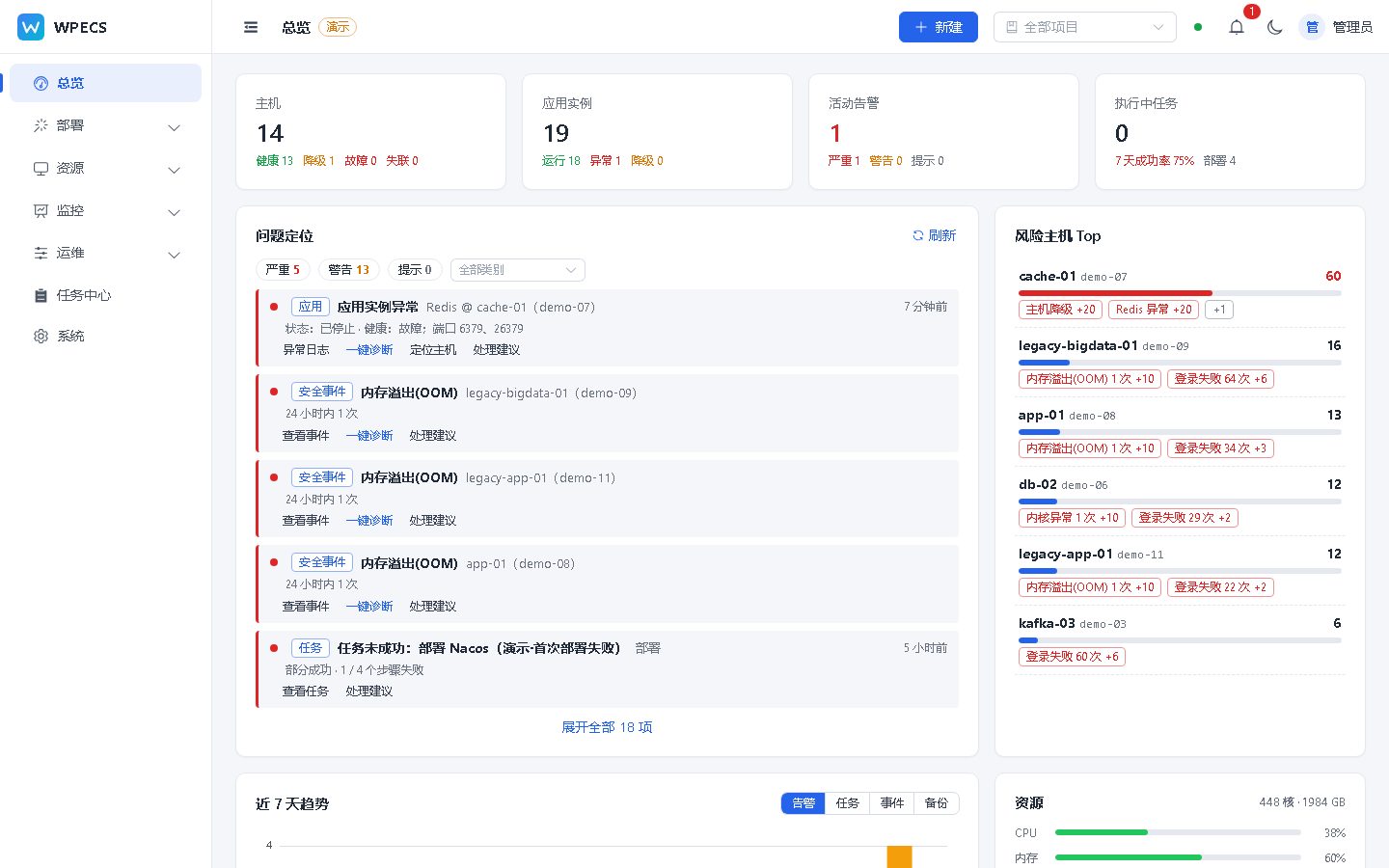
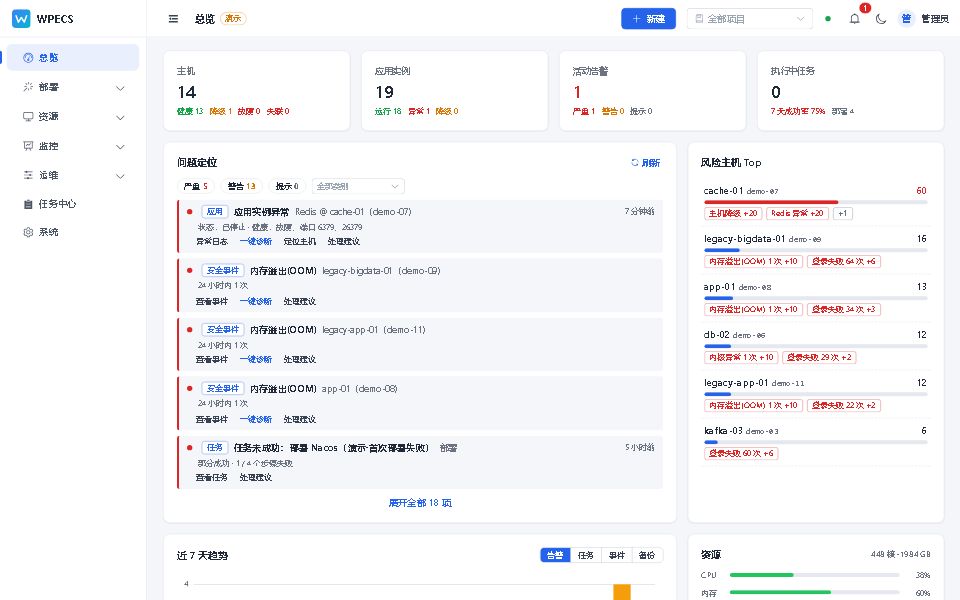
Overview: issues ranked by severity with direct actions, riskiest hosts and resource summary
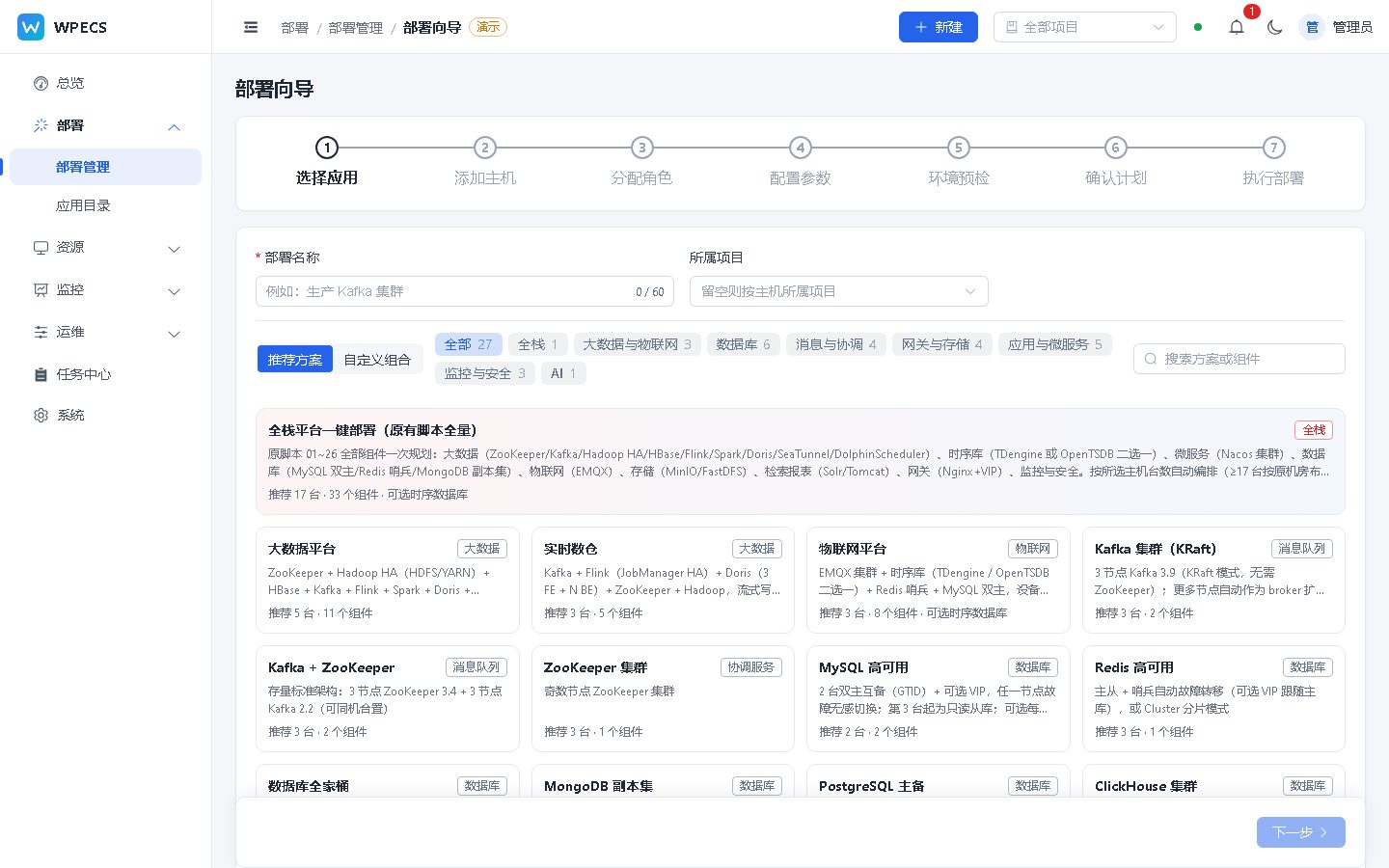
Deployment wizard: 27 recommended solutions across full stack, big data, databases, messaging, gateways and storage, monitoring and AI
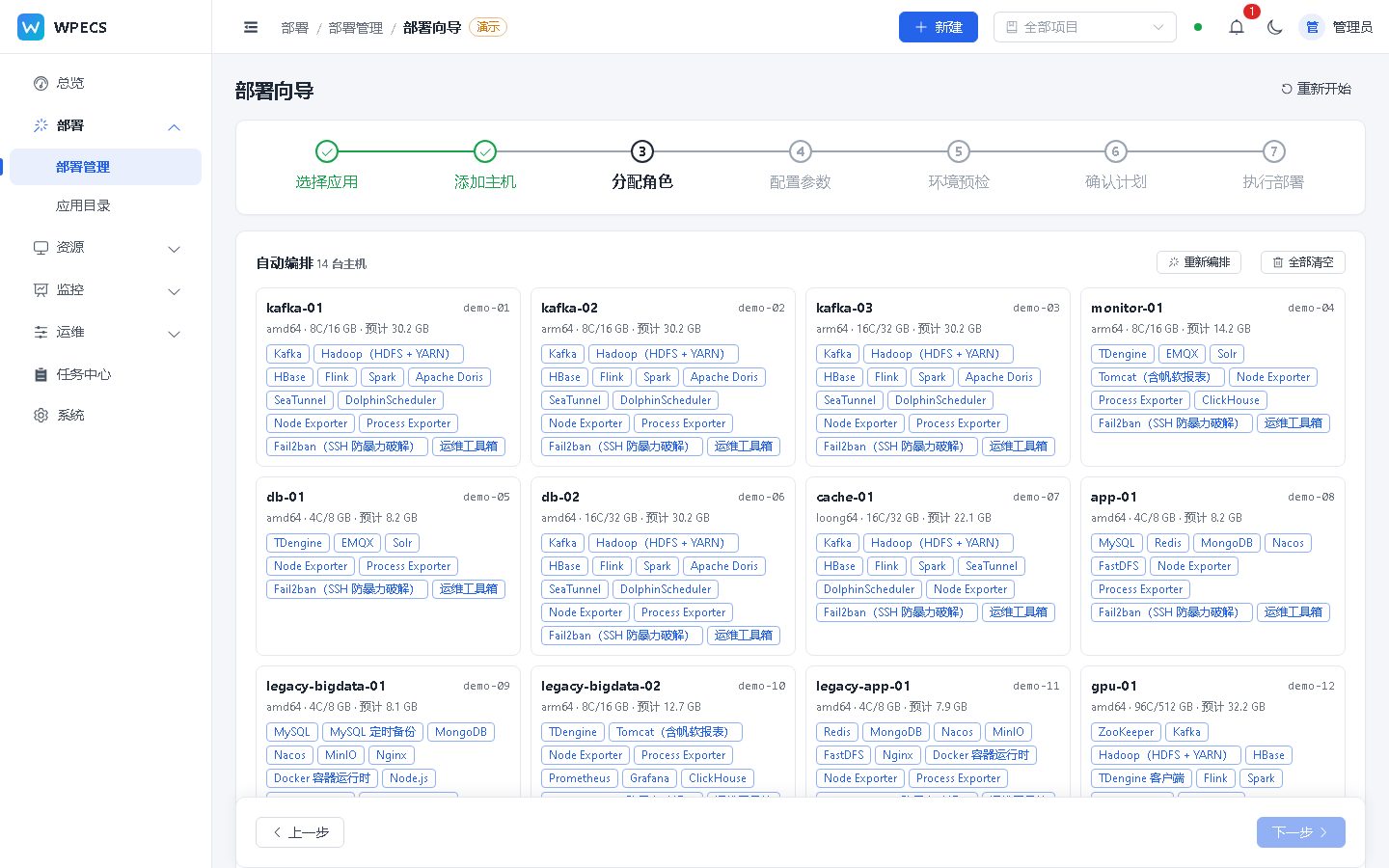
Automatic role assignment: components placed by host size and zone, adjustable by row or column
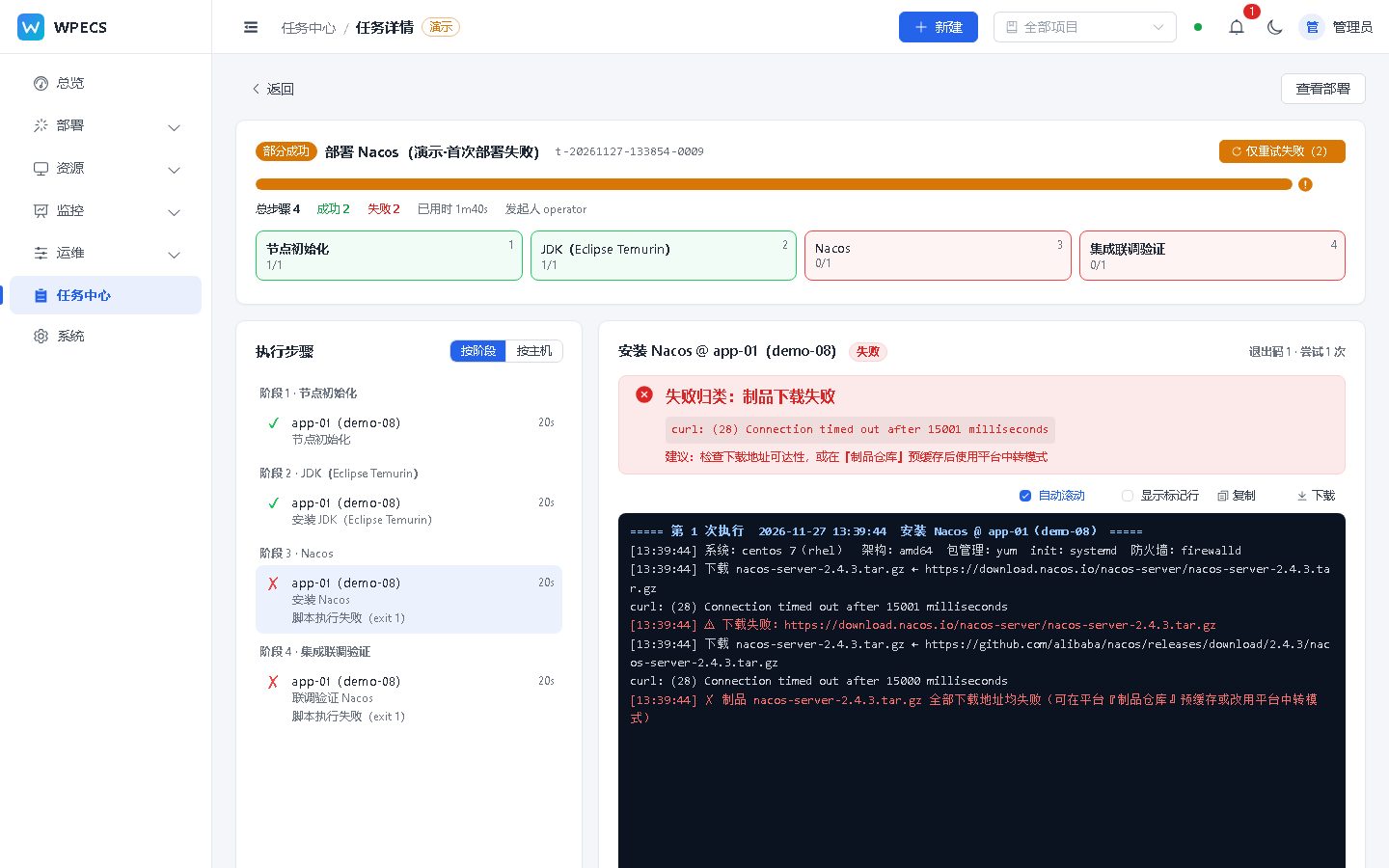
Task details: stages run in parallel, failed steps are classified (such as an artifact download failure) with advice
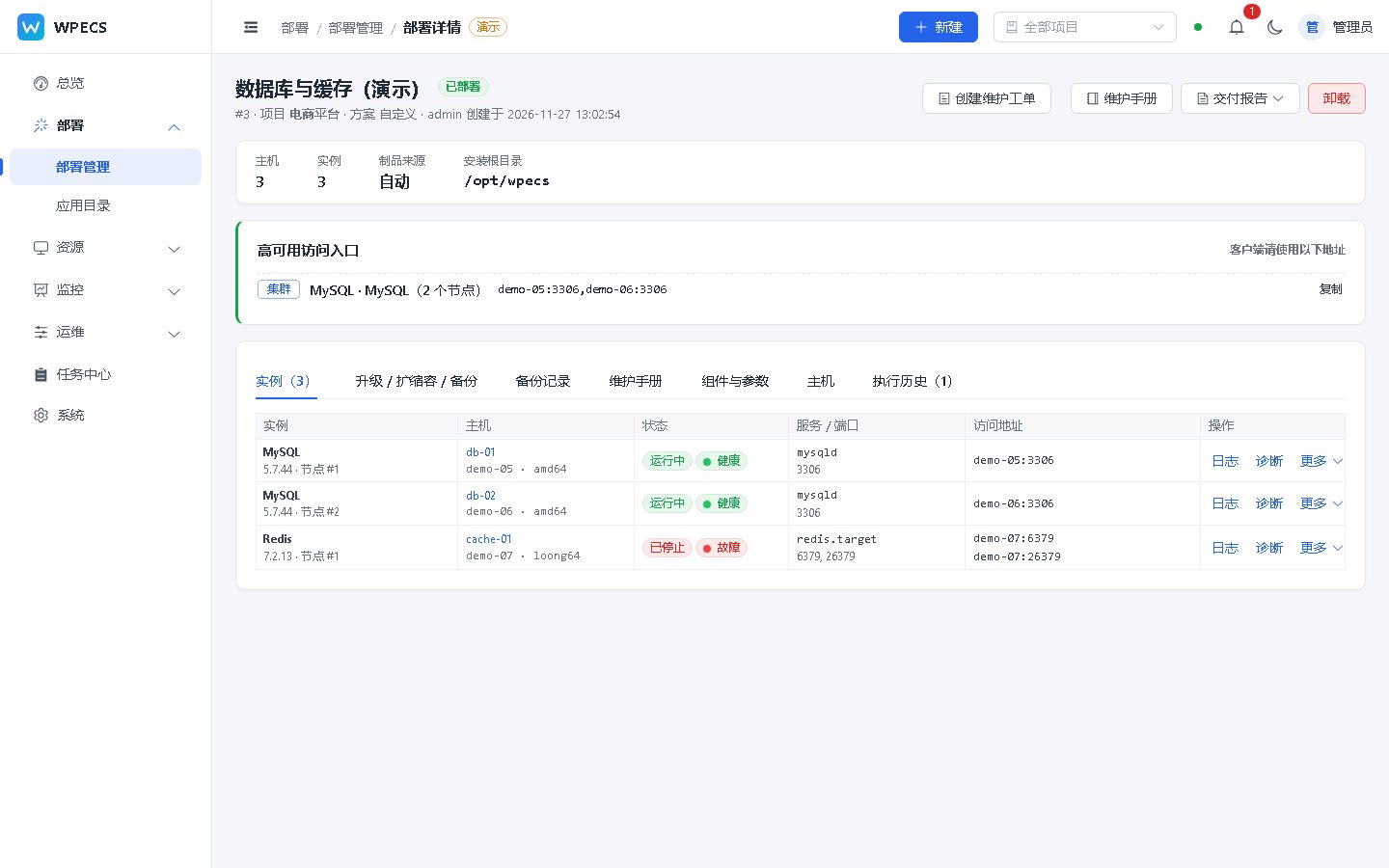
Deployment details: HA access entries, instance health, upgrade / scaling / backup and the maintenance manual
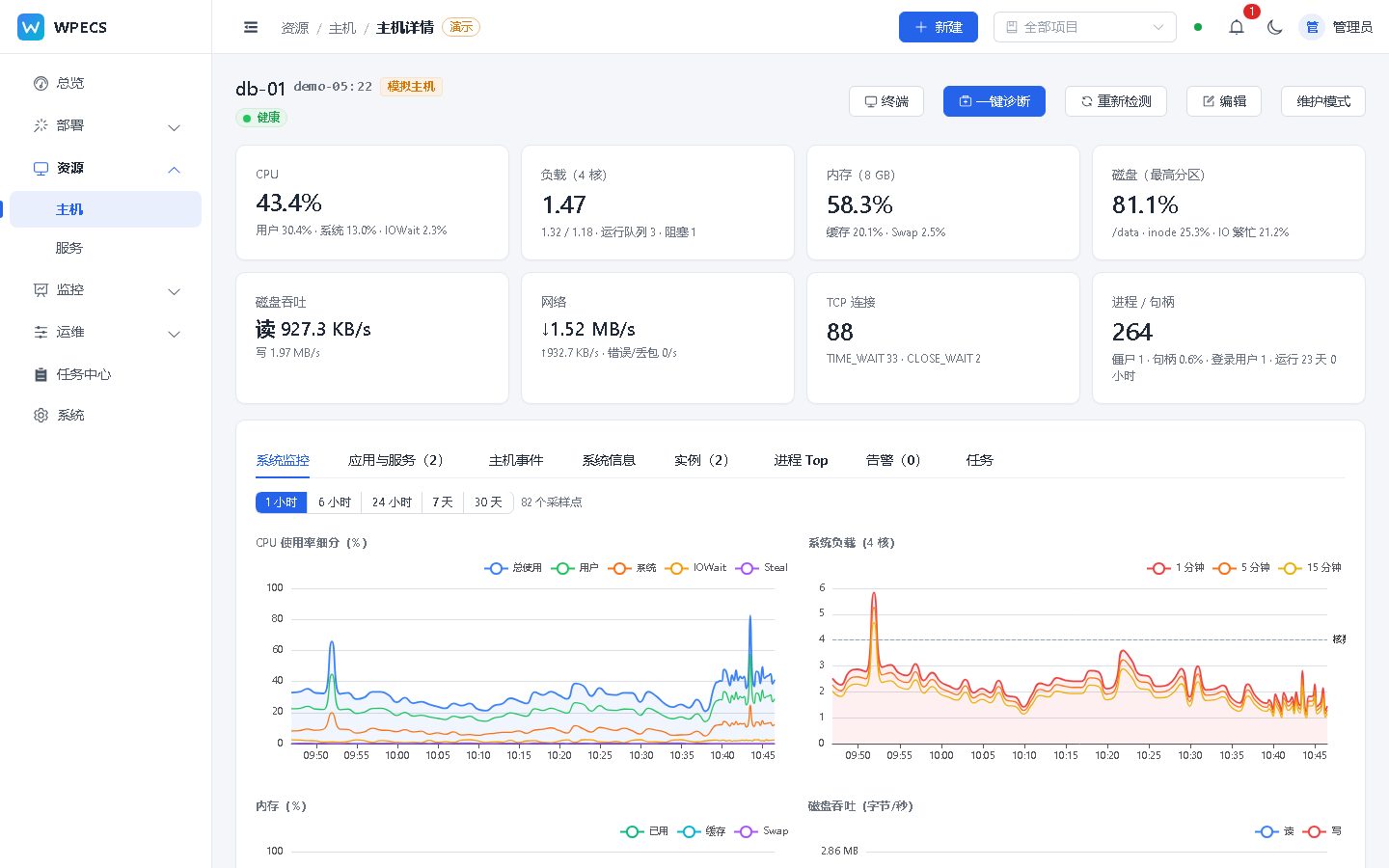
Host details: in-depth CPU, load, memory, disk, network, TCP and process monitoring
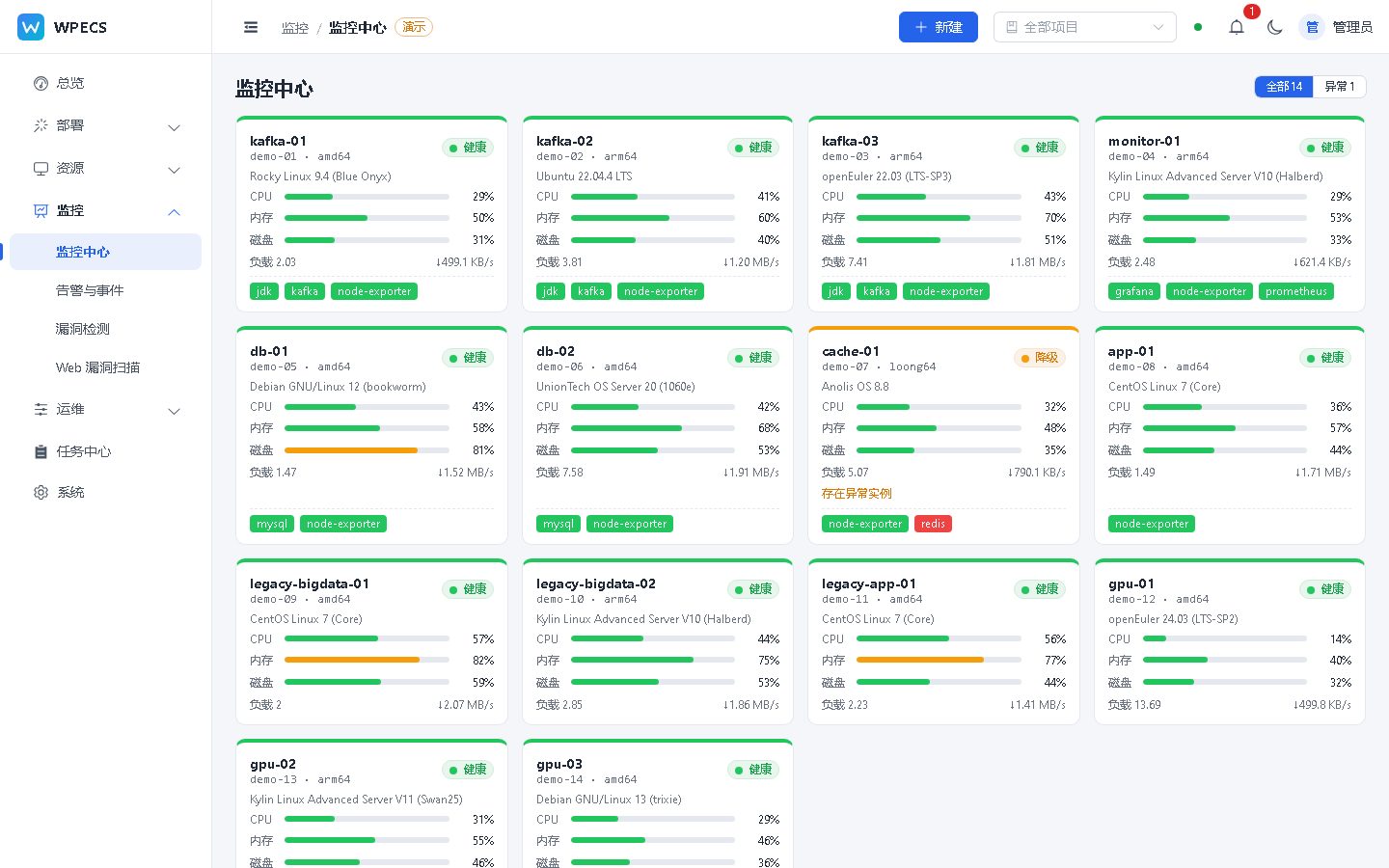
Monitoring center: health, resource usage and deployed components of every host
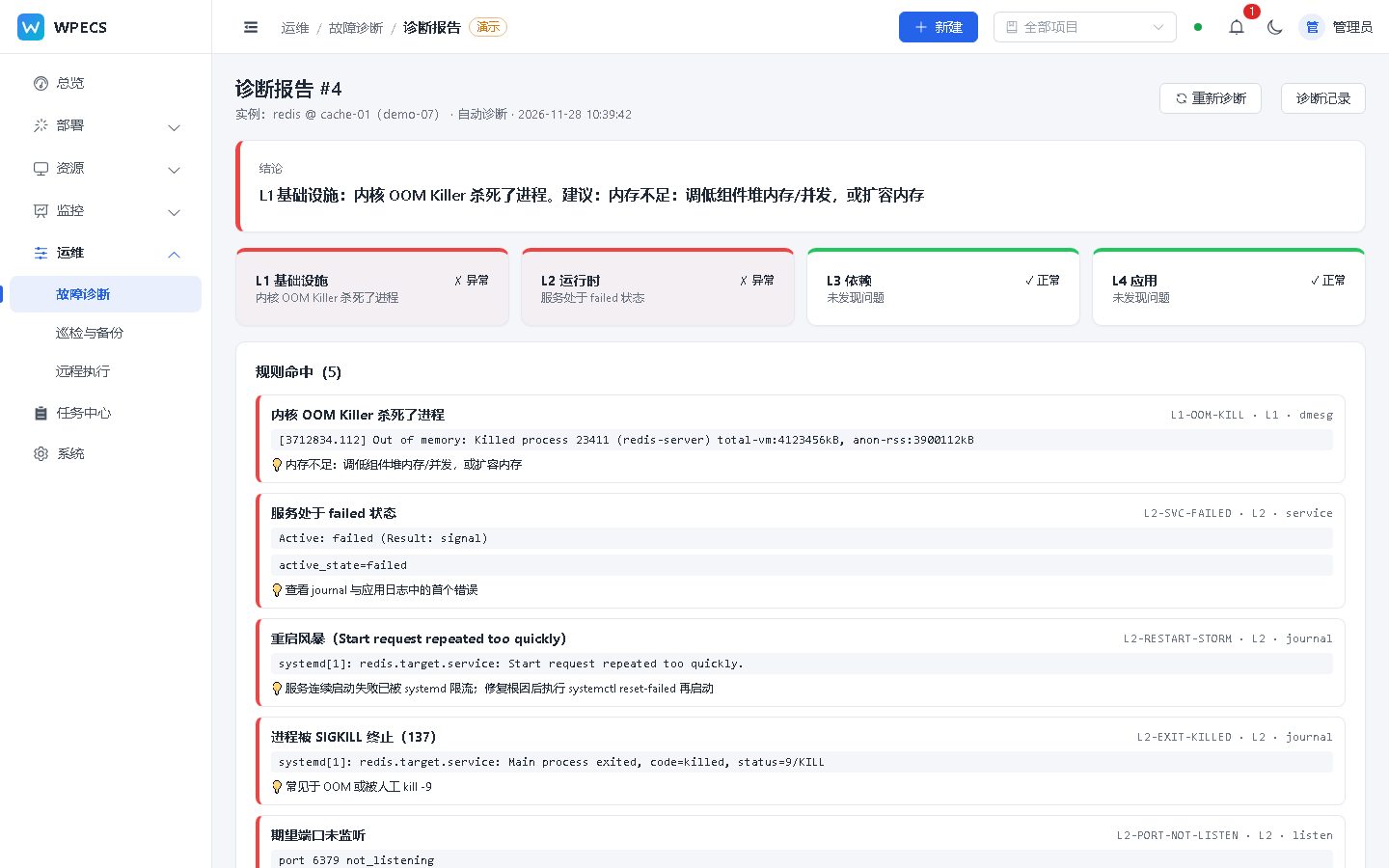
Diagnosis report: L1 to L4 findings, matched rules with evidence, and remediation advice

The screenshots come from WPECS demo mode: hosts, deployments and alerts are produced by the built-in simulator, and no real server is contacted.

Delivery in four steps

  1. Enter IPs and a password or private key: distribution, architecture, memory and disks, systemd and firewall are detected automatically;
  2. Pick a solution: components are arranged by the number of hosts and form highly available clusters by default;
  3. Confirm the plan: pre-checks (ports, disks, clocks, permissions, artifact reachability), parallel installation by dependency, cluster initialization and automatic integration checks (Kafka produce and consume, HDFS read and write, database replication and more);
  4. Operate: monitoring and alerts, one-click diagnosis, rolling upgrades, scaling, scheduled inspections and backups, maintenance manuals and delivery reports.

Projects already delivered with old scripts do not need a reinstall: import the original config.ini, and the platform discovers the services and their actual versions on every machine read-only, then brings them under monitoring and operations once you confirm.

Built-in components

CategoryComponents
Big dataHadoop, HBase, Flink, Spark, Apache Doris, SeaTunnel, DolphinScheduler, OpenTSDB
Messaging and coordinationKafka (ZooKeeper or KRaft), ZooKeeper, etcd, Nacos
DatabasesMySQL (dual primary with VIP), Redis (Sentinel / Cluster), MongoDB, PostgreSQL, TDengine, ClickHouse
IoT and storageEMQX, MinIO, FastDFS
Search and webSolr, Tomcat, Nginx, HAProxy
ObservabilityPrometheus, Grafana, Node Exporter, Process Exporter
AI inferenceNVIDIA GPU driver (offline install), vLLM inference service
Application releaseJava apps (jar to systemd, with rollback), Docker Compose apps, custom scripts (security-scanned before running)

Components are declarative: a component.yaml (versions, architectures, ports, parameters, artifacts, health checks, node roles) plus install, cluster init, verify and uninstall scripts. Drop your own component directory into the data directory to extend it; a shared shell library adapts the scripts to dnf, yum, apt, zypper and other package managers, the common firewalls and systemd.

Use cases

Private delivery teams and integrators

Capture delivery know-how as solutions and components, run new projects through the wizard, and get delivery reports and maintenance manuals generated

Taking over existing projects

Adopt services deployed by old scripts read-only, identify their real versions, and move monitoring, diagnosis, upgrades and backups onto the platform

Domestic OS and multi-architecture environments

Kylin, UnionTech UOS, openEuler and other domestic systems, on 7 architectures including amd64, arm64 and LoongArch

Offline networks and GPU inference

Export packages per architecture and import them offline; install GPU drivers and vLLM offline, with models and parallelism recommended per GPU

Deployment

cp .env.example .env
docker compose up -d                                  # ready when STATUS shows healthy
docker compose exec wpecs cat /data/initial-admin.txt # initial admin password (must be changed on first sign-in)

You can also use the one-step systemd installer or run the binary directly. The platform makes no outbound connections by default; it only reaches out once notification channels, AI models or online package sources are configured. Demo mode comes with simulated hosts, deployment history, monitoring charts, alerts and diagnoses, and every action runs in the simulator without touching a real server.

Getting WPECS

For installation packages, a demo environment or delivery services, book a demo or contact us.

Need commercial support or a private deployment of WPECS?

We offer demos, deployment, vendor technical support and custom development to get you running faster.